

Key facts at a glance
- What it is
- Pipedrive is a cloud-based Customer Relationship Management (CRM) platform designed specifically to help sales teams manage leads, deals, and customer relationships.
- Pricing
- from $14.98/month
- Best for
- Small to mid-market B2B sales teams needing visual deal management
Last updated:
Why this tool?
- Visual pipeline management with drag-and-drop deal tracking for sales teams
- AI-powered sales forecasting and activity reminders to boost rep productivity
- Mobile-first design enabling full CRM access from smartphones and tablets
- Seamless integration with 500+ business apps without custom coding required
When NOT to use?
- Very small teams or solo operators: Pipedrive's pricing ($12+/user/month) may be excessive for freelancers or 1-2 person businesses. Free alternatives like Airtable or Notion offer comparable basic CRM functionality.
- Complex, highly customized workflows: If you need extensive custom fields, complex automation rules, or industry-specific processes, platforms like Salesforce provide deeper customization options.
- Enterprise-level reporting needs: Large organizations requiring advanced analytics, custom reporting, and multi-level forecasting should consider Salesforce or Microsoft Dynamics 365.
- Integrated accounting requirements: If you need tight ERP/accounting system integration, dedicated platforms like Zoho CRM or SAP solutions offer better native connections.
- Minimal CRM needs: If you only need basic contact management without sales pipeline tracking, spreadsheets or lightweight tools like HubSpot Free suffice.
Pipedrive Review: Comprehensive CRM Software for Sales Teams
Pipedrive is a cloud-based Customer Relationship Management (CRM) platform designed specifically to help sales teams manage leads, deals, and customer relationships. Founded in 2010, the software has become a popular choice for small to mid-sized businesses seeking an affordable alternative to enterprise-level CRM solutions. This Pipedrive review examines its core features, advantages, and limitations to help you determine if it's the right fit for your sales operations.
Core Features and Functionality
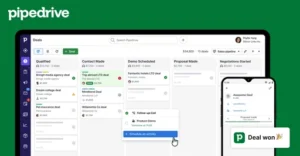
Pipedrive's primary strength lies in its visual sales pipeline management. The platform displays deals as cards that users can drag and drop across customizable pipeline stages, providing immediate visibility into sales progress. This intuitive interface makes it easy for sales teams to track opportunities from initial contact through closure without extensive training.
- Deal and lead management with customizable pipeline stages
- Contact and company database organization
- Activity tracking and scheduling with calendar integration
- Email integration and synchronization capabilities
- Reporting and analytics dashboards
- Mobile application for iOS and Android devices
- API access for third-party integrations
- Automation tools for repetitive tasks
Strengths of Pipedrive
Pipedrive excels at providing an affordable, user-friendly solution for sales-focused teams. The visual pipeline interface requires minimal onboarding, and most users can navigate the platform intuitively. Pricing is transparent and scalable, allowing small teams to start with basic plans and upgrade as they grow. The software integrates well with popular business tools including Gmail, Outlook, Slack, and Zapier, enabling seamless workflow integration without expensive custom development.
For sales teams prioritizing lead and deal tracking without complex enterprise features, Pipedrive delivers solid functionality at a reasonable cost. The mobile app performs well for field sales representatives who need access on-the-go, and automation capabilities reduce administrative burden for repetitive tasks.
Realistic Limitations
Despite its strengths, Pipedrive has notable limitations worth considering. The platform is fundamentally a sales-focused tool, making it less suitable for organizations requiring comprehensive customer service features, marketing automation, or extensive financial management. Customer support, while available, has received mixed reviews regarding response times, particularly for lower-tier subscription levels.
- Limited customization compared to enterprise CRM platforms
- Advanced reporting capabilities require higher-tier plans
- Marketing automation features are minimal or absent
- Customer service functionality is basic compared to dedicated service platforms
- Data import from legacy systems can require manual effort
- Steep learning curve for advanced features beyond pipeline management
Pricing Structure
Pipedrive operates on a subscription model with multiple pricing tiers, starting from basic plans for individual users and scaling to enterprise solutions. The transparent pricing structure allows businesses to calculate costs accurately, though advanced features and higher user limits come at increased expense.
Is Pipedrive Right for You?
Pipedrive works best for sales-driven organizations with 2-500 employees that prioritize deal management and pipeline visibility. Teams seeking the best CRM software for pure sales operations will find Pipedrive competitive. However, organizations needing integrated customer service, marketing automation, or complex financial tracking should explore Pipedrive alternatives that offer broader functionality.
Evaluate your specific business requirements, integration needs, and team size before committing to any CRM platform. Pipedrive's free trial allows hands-on evaluation before purchase.
Pricing
Show price history table
| Date | Lite | Growth | Premium | Ultimate |
|---|---|---|---|---|
| Jul 2026 | Custom | Custom | Custom | Custom |
Ready to try Pipedrive?
Try Pipedrive for free and see for yourself.
Pipedrive vs. Alternatives
| Feature | Pipedrive | HubSpot CRM | Salesforce |
|---|---|---|---|
| Visual sales pipeline management | ✓ | ✓ | ✓ |
| AI-powered deal recommendations | ✓ | ○ | ○ |
| Built-in calling and video conferencing | ✓ | ✓ | ✗ |
| Activity-based selling (ABS) | ✓ | ✗ | ✗ |
| Workflow automation builder | ✓ | ✓ | ✓ |
| Web forms and landing pages | ✗ | ✓ | ○ |
| Mobile app with offline functionality | ✓ | ○ | ✓ |
| Custom field and object creation | ○ | ✓ | ✓ |
| Starting price | $14/mo | Free | $165/mo |
✓ Supported ○ Limited ✗ Not supported
vs. Alternatives
- vs. Salesforce: Pipedrive offers faster implementation at 1/3 the cost with intuitive UX
- vs. HubSpot: Pipedrive specializes purely in sales with superior pipeline visualization
Frequently Asked Questions
- Is Pipedrive free to use?
- Pipedrive offers a free plan with basic features for up to 2 users, including deal management and contact tracking. However, for advanced features like automation, custom fields, and team collaboration, you'll need to upgrade to one of their paid subscription plans starting at $14 per user per month.
- What is Pipedrive best for?
- Pipedrive is best for sales teams and small businesses looking to manage their sales pipeline, track deals, and improve conversion rates through a visual, easy-to-use interface. It's particularly effective for sales-driven organizations that want to focus on closing deals rather than complex CRM setups.
- How much does Pipedrive cost per month?
- Pipedrive's pricing starts at $14 per user monthly for the Essential plan, with Professional at $39, Advanced at $59, and Enterprise plans available at custom rates. All paid plans include features like automation, email integration, and API access, with pricing discounts available for annual commitments.
- Can Pipedrive integrate with other tools?
- Yes, Pipedrive offers integrations with over 400+ third-party applications including Gmail, Slack, HubSpot, Zapier, and many others through its open API. These integrations help automate workflows and connect your sales data with the tools your team already uses.
- Is Pipedrive suitable for small businesses?
- Yes, Pipedrive is ideal for small businesses and startups due to its affordable pricing, intuitive interface, and sales-focused features that don't require extensive training. The free plan and low-cost paid tiers make it accessible for businesses with limited budgets while still providing powerful sales management capabilities.
