

TL;DR:
- Choosing the right CRM depends on your budget, ecosystem, and growth focus, whether sales or marketing. HubSpot CRM offers a strong free entry with scalable paid upgrades, while Salesforce excels in enterprise customization and AI capabilities. Effective implementation and ecosystem fit are critical for maximizing ROI and adoption.
The best CRM software for most businesses comes down to three decisions: how much you want to pay upfront, which ecosystem you already live in, and whether sales or marketing drives your growth. Here is the short answer before the details.
Top picks by use case:
- HubSpot CRM — Best free-to-paid path; unlimited free users, no expiration date, clear upgrade to marketing automation
- Salesforce Sales Cloud — Best for enterprise; deepest customization, agentic AI across clouds, and the broadest app ecosystem via AppExchange
- Zoho CRM — Best value for SMBs; strong price-to-feature ratio with vendor-managed migration services
- Microsoft Dynamics 365 — Best for Microsoft shops; native Copilot AI and seamless Outlook/Teams integration
- Pipedrive — Best for sales-led teams; visual Kanban pipeline built around deal hygiene
- Freshsales (Freshworks) — Best price-to-AI tradeoff; Freddy AI features at entry-tier prices
- ActiveCampaign — Best for marketing automation; advanced email workflows and customer lifecycle orchestration
These seven cover the vast majority of buying scenarios. Forbes Advisor’s 2026 CRM roundup evaluated 41 providers across 35+ metrics to reach similar conclusions. The picks below are grounded in that same multi-source methodology: feature parity, pricing transparency, AI capabilities, ecosystem fit, and real adoption signals from review aggregators like G2.
One warning before you dive in: the biggest CRM failure mode is not picking the wrong vendor. It is the implementation gap, the lag between purchase and the point where your team actually uses the tool daily. Budget for that gap as seriously as you budget for the subscription.
Table of Contents
- The best CRM software options compared by use case
- At-a-glance CRM comparison table
- How to choose a CRM: a practical selection guide
- How these picks were chosen: scoring and methodology
- Integrating your CRM with accounting, support, and other core tools
- Key Takeaways
- The CRM market rewards patience, not speed
- Toolsplorer makes CRM shortlisting faster
- Sources and further reading
- FAQ
The best CRM software options compared by use case
1. HubSpot CRM — Best free CRM and best for growing teams
HubSpot’s free tier is genuinely functional, not a stripped-down trial. You get contact management, deal pipelines, a reporting dashboard, and the Breeze AI assistant at no cost, with no expiration date and no cap on users. That combination is rare. The catch: paid tiers scale steeply. The Professional plan starts at $75 per seat per month, and advanced marketing automation features live behind those paid walls.
Best for: Startups and SMBs that want a no-cost entry point and a clear upgrade path without migrating to a new platform later. HubSpot’s architecture means you build on what you already have rather than starting over.
Pros: Unlimited free users, strong onboarding resources, tight integration across HubSpot’s own marketing and service hubs. Cons: Costs climb fast once you need custom reporting, AI lead scoring, or advanced automation. See the full HubSpot review on Toolsplorer for a detailed pricing breakdown.
2. Salesforce Sales Cloud — Best for enterprise
Salesforce is the reference standard for enterprise CRM, and the gap between it and the next competitor widens every year on the AI front. Einstein GPT and its newer agentic capabilities now automate workflows across sales, service, and marketing clouds, not just surface insights. The AppExchange ecosystem has thousands of pre-built integrations, and MuleSoft handles the custom ones.

Best for: Large organizations with complex, multi-department workflows, dedicated Salesforce admins, and integration needs that go beyond what any out-of-the-box CRM handles. Implementation is heavy; plan for it.
Pros: Unmatched extensibility, enterprise-grade security, the most mature AI roadmap in the category. Cons: High total cost of ownership, steep learning curve, and you will need dedicated admin resources from day one.
3. Zoho CRM — Best value for SMBs
Zoho’s price-to-feature ratio is hard to beat at the SMB level. The platform covers sales automation, marketing campaigns, analytics, and customer support, and it connects natively to the broader Zoho suite (Zoho Books, Zoho Desk, Zoho Campaigns). For teams switching from another CRM, Zoho offers jumpstart and enterprise migration programs that reduce go-live risk.

Best for: Budget-conscious SMBs and mid-market teams that want an integrated app ecosystem without paying enterprise prices.
Pros: Broad native suite, competitive pricing, vendor-managed migration services. Cons: The UI can feel cluttered, and some advanced features require higher-tier plans or add-ons.
4. Microsoft Dynamics 365 — Best for Microsoft-first organizations
If your team lives in Outlook, Teams, and Excel, Dynamics 365 removes the context-switching that kills CRM adoption. Native Copilot AI surfaces deal summaries, drafts emails, and flags at-risk accounts directly inside Teams. Ecosystem fit speeds adoption, and Dynamics is the clearest example of that principle in practice.
Best for: Organizations standardized on Microsoft 365 that want CRM data to flow naturally through their existing tools rather than requiring a separate login.
Pros: Deep Office integration, Copilot AI built in, strong enterprise compliance controls. Cons: Licensing is complex, and the platform is overkill for teams that are not already Microsoft-heavy.
5. Pipedrive — Best for sales-led teams
Pipedrive was built by salespeople for salespeople, and it shows. The Kanban pipeline is the cleanest in the category, deal-stage hygiene is enforced by design, and the automations are sales-centric rather than marketing-first. It does not try to be a full marketing suite, which is exactly why sales teams adopt it faster than broader platforms.
Best for: Outbound and inside-sales teams that prioritize pipeline visibility and speed over marketing automation depth.
Pros: Intuitive UI, fast onboarding, strong mobile app. Cons: Limited native marketing automation; you will need integrations for anything beyond basic email sequences.
6. Freshsales (Freshworks) — Best price-to-AI value
Freshsales delivers Freddy AI, including lead scoring, deal insights, and predictive forecasting, at price points that most SMBs can actually afford. Built-in telephony is another differentiator: you get a power dialer and call logging without a third-party add-on. For inside-sales teams that want AI without an enterprise budget, Freshsales is the strongest option in the market right now.
Best for: SMBs running inside-sales operations that want AI lead scoring and built-in calling without paying Salesforce prices.
Pros: Freddy AI on accessible tiers, built-in telephony, clean UI. Cons: The broader Freshworks ecosystem is deep but can feel fragmented if you need tight marketing-CRM integration.
7. ActiveCampaign — Best for marketing automation
ActiveCampaign sits at the intersection of CRM and marketing automation more naturally than any other platform on this list. Its automation builder handles multi-step customer journeys, behavioral triggers, and lifecycle segmentation in ways that dedicated CRMs typically require expensive add-ons to replicate. The sales CRM component is solid but secondary to the marketing engine.
Best for: Teams where marketing drives pipeline and email automation is the primary growth lever.
Pros: Best-in-class automation workflows, strong deliverability, good CRM-marketing data sync. Cons: The CRM side is less mature than Salesforce or HubSpot; not ideal if sales pipeline management is the primary need.
8. Copper — Best for Google Workspace teams
Copper embeds directly into Gmail and Google Drive, which means your team never has to leave their inbox to log a contact, update a deal, or attach a document. Setup takes hours, not weeks. For teams that have resisted CRM adoption because of the “extra system” problem, Copper solves it by making the CRM invisible.
Best for: Teams fully embedded in Google Workspace who want CRM data without leaving Gmail.
Pros: Near-zero context-switching, fast setup, clean Google-native UX. Cons: Limited outside the Google ecosystem; not a fit for Microsoft shops or teams needing advanced marketing automation.
9. Close — Best for high-velocity inside sales
Close is built around communication speed: integrated power dialer, email sequences, SMS, and call recording all live in one place. The pipeline view is clean, but the real differentiator is how fast a rep can move through a call list without toggling between tools. It is a narrow tool that does its job extremely well.
Best for: Inside-sales teams running high-volume outreach where call speed and sequence automation are the primary metrics.
Pros: Integrated dialer, fast rep workflows, strong reporting on communication activity. Cons: Not a full-suite CRM; limited marketing automation and service/helpdesk features.
10. Other notable platforms worth knowing
Several other CRMs appear consistently in market comparisons and deserve a mention for specific use cases:
- monday.com (Monday CRM): Strong project-management DNA; works well when deal delivery and project execution need to live in the same tool. Pairs naturally with teams already using monday.com for project management.
- Zendesk: Best when customer support is the primary CRM use case; its ticketing and help-desk features are class-leading.
- Insightly: Solid mid-market option with project management built in; good for professional services firms.
- Keap (formerly Infusionsoft): Strong small-business automation for solopreneurs and micro-teams; combines CRM, email, and invoicing.
- Nutshell: Clean, affordable CRM for small B2B teams that want simplicity without sacrificing pipeline reporting.
- Bitrix24: Free tier with a broad feature set including telephony, project management, and HR tools; best for teams that want a free all-in-one.
- Brevo (formerly Sendinblue): Email-first platform with a CRM layer; strong for transactional email and marketing campaigns.
- Agile CRM: Budget option for small teams needing basic contact management and email automation.
- Apptivo: PCMag’s Editors’ Choice for flexibility; deep lead profiles and strong customization at a competitive price.
- EngageBay: All-in-one marketing, sales, and service platform targeting small businesses on tight budgets.
- Capsule: Lightweight CRM for small teams that want simplicity and a clean contact timeline.
- Nimble: Social-CRM hybrid that pulls contact data from LinkedIn and social profiles; useful for relationship-driven sales.
- Streak: Gmail-native CRM similar to Copper; good for freelancers and small teams already in Google Workspace.
- Attio: Modern, data-model-flexible CRM popular with tech startups that want to customize their pipeline structure.
- Clarify: AI-native CRM built for async, relationship-intelligence-first workflows; newer entrant gaining traction.
- Twenty: Open-source CRM for technical teams that want full data control and self-hosting.
- Vtiger: All-in-one CRM with sales, marketing, and help-desk modules; strong for SMBs wanting a single vendor.
- Snov.io: Prospecting-first platform combining email finder, drip campaigns, and a lightweight CRM.
- Clay: Data enrichment and outreach automation tool; functions as a CRM layer for outbound-heavy GTM teams.
- eWay-CRM: Outlook-native CRM for teams that want CRM functionality without leaving Microsoft Outlook.
- Creatio: No-code CRM and BPM platform for mid-market and enterprise teams that need process automation.
- SugarCRM (Sugar Sell): Open-source roots with enterprise features; strong for organizations that want on-premise or private-cloud deployment.
- NetSuite CRM: Best when CRM needs to sit inside a full ERP; strong for product companies managing orders and financials alongside sales.
- Sage: ERP-adjacent CRM for accounting-heavy businesses already on Sage’s financial platform.
- SAP CRM / SAP Sales Cloud: Enterprise-grade, deeply integrated with SAP ERP; best for large manufacturers and distributors.
- Qualtrics: Experience-management platform with CRM-adjacent capabilities; best for organizations that treat customer feedback as a core data source.
- Nextiva: UCaaS-first platform with CRM features; strong for teams that want phone, video, and CRM in one subscription.
- Maximizer: Veteran CRM with strong financial-services and insurance-industry adoption.
- Act!: Long-running contact management and CRM tool; best for small businesses and independent professionals who want a simple, affordable desktop-friendly option.
- HubSpot Smart CRM: HubSpot’s unified CRM layer that connects Marketing Hub, Sales Hub, and Service Hub; the same platform as HubSpot CRM but marketed as the full connected suite.
- Nimble, Nutshell, Insightly are covered above.
Pro Tip: Before trialing any platform, map your team’s daily-driver tools (email client, calendar, phone system) and check native integration depth first. A CRM that connects to your existing stack on day one will see adoption rates that a technically superior but disconnected platform never will.
At-a-glance CRM comparison table
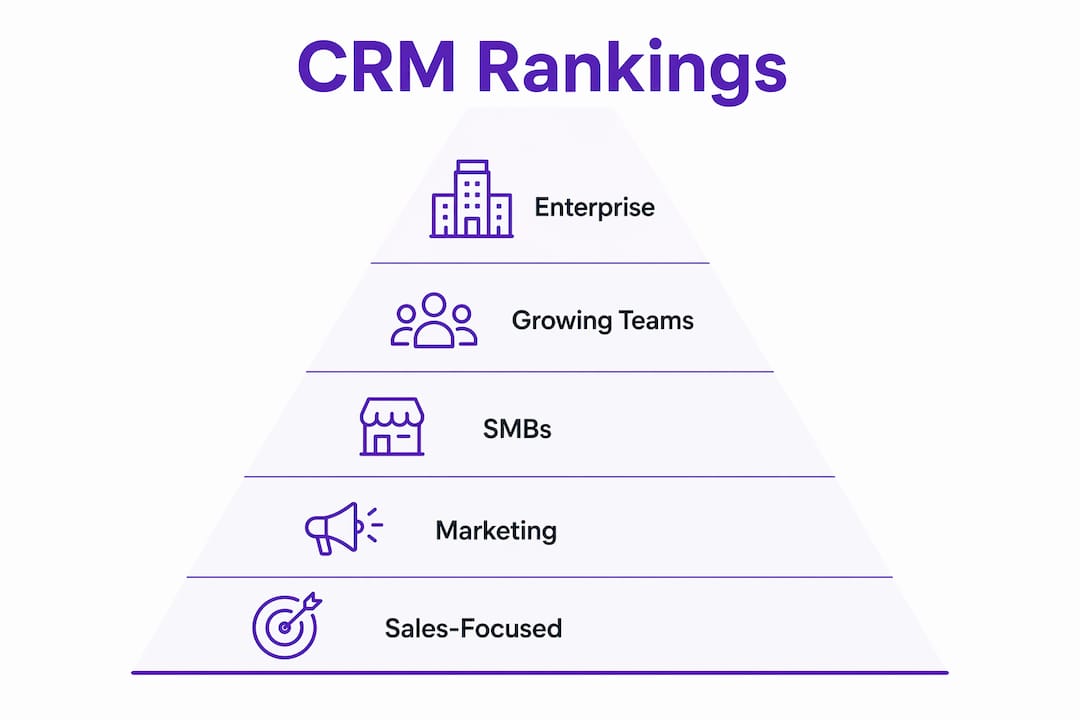
| CRM | Best for | Company size | Starting price / free tier | Ease of use | Integrations | Key features | AI features | Typical onboarding | Support reliability |
|---|---|---|---|---|---|---|---|---|---|
| HubSpot CRM | Free-to-paid growth path | SMB to mid-market | Free forever | High | Google + Microsoft | Contact mgmt, pipelines, marketing | Breeze AI assistant | Days | Strong (docs + community) |
| Salesforce Sales Cloud | Enterprise scale | Mid-market to enterprise | Paid (no free tier) | Low-medium | Both + AppExchange | Sales, service, marketing clouds | Einstein / agentic AI | Weeks to months | Premium tiers available |
| Zoho CRM | SMB value | SMB to mid-market | Free tier (3 users) | Medium | Google + Microsoft | Sales, marketing, analytics | Zia AI | Days to weeks | Good (Jumpstart program) |
| Microsoft Dynamics 365 | Microsoft-first orgs | Mid-market to enterprise | Paid | Medium-high | Microsoft-native | Sales, service, ERP ties | Copilot AI | Weeks | Enterprise SLA |
| Pipedrive | Sales pipeline focus | SMB to mid-market | Paid (14-day trial) | High | Google + Microsoft | Pipeline, automations | AI sales assistant | Days | Good |
| Freshsales | Price-to-AI value | SMB | Paid (free tier available) | High | Google + Microsoft | Sales, telephony | Freddy AI | Days | Good |
| ActiveCampaign | Marketing automation | SMB to mid-market | Paid | Medium | 900+ integrations | Email, CRM, automation | Predictive sending | Days to weeks | Good |
| Copper | Google Workspace teams | SMB | Paid (14-day trial) | High | Google-native | Contact mgmt, pipelines | Basic AI | Hours to days | Good |
| Close | Inside sales velocity | SMB to mid-market | Paid | High | Email + phone | Dialer, sequences, pipeline | AI call summaries | Days | Good |
| monday.com CRM | Project-linked sales | SMB to mid-market | Free tier available | High | Google + Microsoft | Pipeline, project mgmt | AI automations | Days | Good |
| Zendesk | Customer support CRM | SMB to enterprise | Paid | Medium | 1,000+ integrations | Ticketing, service, CRM | AI agents | Days to weeks | Strong |
| Apptivo | Flexible SMB CRM | SMB | Paid (free tier) | Medium | Google + Microsoft | Lead mgmt, invoicing | Basic AI | Days | Good |
| Keap | Solopreneur automation | Micro to SMB | Paid | Medium | 230+ integrations | Email, CRM, invoicing | Basic automation | Days | Good |
| Bitrix24 | Free all-in-one | SMB | Free tier (unlimited users) | Medium | Google + Microsoft | CRM, telephony, HR | AI assistant | Days to weeks | Community + paid |
| Creatio | No-code BPM + CRM | Mid-market to enterprise | Paid | Medium | Broad | Sales, marketing, BPM | AI process automation | Weeks | Good |
| NetSuite CRM | ERP-integrated CRM | Mid-market to enterprise | Paid | Low-medium | NetSuite ERP-native | Sales, orders, financials | AI forecasting | Weeks to months | Strong |
| SAP Sales Cloud | Large enterprise ERP | Enterprise | Paid | Low | SAP-native | Sales, service, ERP | AI insights | Months | Enterprise SLA |
Top three picks by company profile:
- Early-stage or budget-constrained teams: Start with HubSpot’s free tier. You get a fully functional CRM with no time limit, and upgrading later does not require a data migration.
- Enterprise organizations with complex workflows: Salesforce Sales Cloud is the default choice when you need deep customization, multi-cloud AI, and a partner ecosystem that can handle any integration requirement.
- SMBs that want strong value and a native app suite: Zoho CRM delivers the broadest feature set per dollar, and the Jumpstart migration program reduces the risk of switching from an existing platform.
How to choose a CRM: a practical selection guide
Picking a CRM is less about features and more about fit. The wrong platform, even a technically excellent one, will cost you more in lost productivity and wasted implementation time than the subscription fees ever would. Teams that feel forced into a poor UX revert to spreadsheets within months.
Core selection criteria
Work through these before you open a single trial:
- Workflow fit: Does the CRM match how your team actually sells or manages customers, not how a vendor thinks you should?
- Integration depth: Check native connections to your email client, calendar, phone system, and accounting software. Zapier bridges are fine for low-volume use; high-volume workflows need native APIs.
- Reporting and visibility: Can managers see pipeline health, forecast accuracy, and activity metrics without custom development?
- AI features: Are AI capabilities built into your target tier, or are they add-ons that push the price up significantly?
- Security and compliance: For healthcare or financial services, verify HIPAA and SOC 2 compliance before shortlisting. GDPR matters for any team with European customers.
- Admin overhead: Who will own the CRM internally? A platform like Salesforce requires a dedicated admin; HubSpot or Pipedrive can be managed by a sales ops generalist.
- Total cost of ownership: Add implementation, training, integrations, and potential professional services to the subscription cost. The sticker price is rarely the real price.
Questions to ask vendors during trials
- What is the data migration process, and do you offer managed migration services?
- What are the API rate limits, and how do they scale with our user count?
- What is your uptime SLA, and how are outages communicated?
- What support tier is included, and what does premium support cost?
- Can we export all our data at any time, in a standard format, without a fee?
The implementation gap: your biggest ROI risk
The implementation gap is the lag between the day you purchase a CRM and the day your team actually uses it as their primary system of record. This gap is the leading cause of poor CRM ROI, and most buying decisions underestimate it completely.
Mitigation steps: run a role-based pilot with your highest-adoption team first, integrate the CRM with your team’s daily-driver tools (email, calendar, phone) on day one, set 90-day adoption metrics before launch, and assign a named internal owner for the rollout.
Pricing shapes to understand
CRMs price in three main ways: per seat (you pay per user per month), per contact (common in marketing-automation-heavy platforms), and tiered bundles (features unlock at higher plan levels). Per-contact pricing can surprise growing teams when their list scales. Always model the cost at 2x your current contact volume before signing.
Red flags: hidden fees for data export, forced annual contracts with no monthly option, support locked behind expensive tiers, and vague answers about API limits.
Pro Tip: Run a 14-day proof-of-concept with real data, not demo data. Import 200 actual contacts, build your real pipeline stages, and have three reps use it daily. You will learn more in two weeks of real use than in ten vendor demos.
How these picks were chosen: scoring and methodology
Every recommendation on this page is built from a multi-source scoring process, not a single review site or vendor claim.
Scoring weights:
- Feature parity and depth (what the platform actually does at each tier)
- Pricing transparency (is the real cost clear before you sign?)
- AI capabilities (built-in vs. add-on, and which tier they appear on)
- Ecosystem integrations (native depth with Google, Microsoft, and third-party tools)
- Ease of use and onboarding time (how fast a real team reaches proficiency)
- Customer support quality and reliability
- Review-aggregation signals from G2, Capterra, and TrustRadius
Primary data sources: Forbes Advisor’s 2026 CRM evaluation (41 providers, 35+ metrics), LeadSpark’s 12-platform tested guide, Witho2’s 2026 buyer comparison, vendor documentation, and G2’s live category rankings.
Normalization approach: Review-aggregation scores are useful for sentiment but should be normalized against verified feature checks and independent tests. A product with 10,000 G2 reviews and a 4.5 rating is not automatically better than one with 500 reviews and a 4.8 rating if the feature set does not match your use case.
A note on update cadence: CRM pricing and AI features change frequently. Vendor packaging can shift between quarters, and AI capabilities in particular are evolving faster than any static comparison can track. Verify pricing directly with vendors during your trial period, and treat any specific price figure in this article as a directional signal rather than a final quote.
Limitations: Vendor pricing pages sometimes differ from what sales teams quote. Enterprise pricing is almost always negotiated. Where exact figures were unavailable, directional labels (paid, free tier, competitive) are used rather than invented numbers.
Integrating your CRM with accounting, support, and other core tools
Google Workspace and Microsoft 365 get most of the integration attention, but the connections that often determine CRM success are the ones to accounting software, customer support platforms, and communication tools.
Accounting integrations matter most for teams where deal close triggers invoicing or revenue recognition. QuickBooks and Xero connect natively to HubSpot, Zoho, and Salesforce. NetSuite CRM is the strongest option when CRM and ERP need to share a single data model, since the two products are built on the same platform. SAP Sales Cloud serves the same function for large manufacturers already on SAP ERP.
Customer support platforms are the other critical connection. Zendesk integrates with most major CRMs via native connectors or Zapier, but it also functions as a standalone CRM for support-first organizations. Freshsales and Freshdesk (both Freshworks products) share a native data layer, which means a support ticket and a sales deal can reference the same contact record without a sync job. HubSpot’s Service Hub does the same within its own ecosystem.
Communication tools beyond email deserve attention. Nextiva bundles UCaaS (phone, video, messaging) with CRM features, which removes one integration entirely. Close and Freshsales both include built-in dialers, reducing reliance on separate telephony integrations. For teams using Slack heavily, Salesforce, HubSpot, and Pipedrive all offer Slack apps that push deal alerts and task notifications into channels.
Marketing and automation platforms are where CRM automation tools like ActiveCampaign, Brevo, and Keap blur the line between CRM and marketing stack. If your primary growth motion is email-driven, consider whether a marketing-automation-first platform with a CRM layer serves you better than a CRM with a marketing add-on. The architecture difference affects how data flows and how campaigns are triggered. For teams evaluating enterprise cloud integration strategy, working with a specialist in enterprise modernization can help map the right integration architecture before you commit to a platform.
Key Takeaways
The single most important decision in a CRM evaluation is matching the platform to your team’s daily workflow, not chasing the longest feature list.
| Point | Details |
|---|---|
| Match platform to workflow | The wrong CRM costs more in lost productivity than subscription fees; poor UX leads teams back to spreadsheets. |
| Free tier entry point | HubSpot’s free CRM offers unlimited users and no expiration date, making it the lowest-risk starting point for SMBs. |
| Implementation gap is the top ROI risk | The lag from purchase to team proficiency is the leading cause of poor CRM ROI; budget for onboarding as seriously as the subscription. |
| Ecosystem fit accelerates adoption | Teams in Google Workspace or Microsoft 365 adopt CRMs built for those environments faster and with higher immediate utility. |
| Toolsplorer for faster shortlisting | Toolsplorer’s AI-driven scoring aggregates reviews and feature data across CRM platforms so you can build a shortlist without reading 40 vendor pages. |
The CRM market rewards patience, not speed
Most CRM buying decisions move too fast. A team gets frustrated with spreadsheets, someone demos two platforms in a week, and the company signs a two-year contract before anyone has run a real pilot. The result is a system that gets used by three people and ignored by everyone else.
The platforms that actually stick are the ones that connect to the tools your team already uses every day. Not the ones with the most features, not the ones with the best demo, and not the ones your competitor uses. The research is consistent: when a CRM becomes the single source of truth for email, calendar, and phone activity, adoption follows. When it is an extra system that requires a separate login and manual data entry, it does not.
One angle that gets underweighted in most comparisons: AI features are moving fast enough that a platform’s AI roadmap matters as much as its current feature set. Salesforce’s agentic model, HubSpot’s Breeze assistant, and Microsoft’s Copilot integration are all evolving quarterly. A platform that looks behind on AI today may close the gap in six months, and vice versa. Build in a re-evaluation checkpoint at 12 months, not just at contract renewal.
Toolsplorer’s editorial approach is to normalize review-aggregation scores against verified feature checks rather than ranking by star ratings alone. A 4.8-star rating from 200 reviews in a niche vertical tells you something different than a 4.5 from 15,000 reviews across industries. Both signals matter; neither is sufficient on its own.
Toolsplorer makes CRM shortlisting faster
Evaluating 40+ CRM platforms is a real time sink, and most buying teams do not have weeks to spare on vendor demos and pricing calls. Toolsplorer’s CRM comparison hub aggregates verified reviews, current pricing snapshots, and AI-driven scores across the platforms covered in this guide, so you can build a shortlist in minutes rather than days.
The scoring engine pulls from multiple review sources and weights them against feature parity and pricing transparency, giving you a normalized view that a single review site cannot. For teams evaluating AI-powered tools alongside CRM options, the category pages cover the full stack.
Start your shortlist at Toolsplorer: filter by company size, budget, and ecosystem, and get to a two-or-three-platform trial list without the noise.
Sources and further reading
The claims and comparisons in this guide draw from the following primary sources. Verify pricing and feature details directly with vendors during your trial, since both change frequently.
| Source | Type | Relevance |
|---|---|---|
| G2 CRM Category — July 2026 | Review aggregator | Live ratings and user sentiment across 500+ CRM products |
| Forbes Advisor — 10 Best CRM Software 2026 | Editorial evaluation | 41 providers scored across 35+ metrics; strong methodology reference |
| LeadSpark — Ultimate Guide to CRM Software 2026 | Buyer guide | 12 platforms tested; implementation gap analysis and pricing table |
| Witho2 — Best CRM Software 2026 | Buyer comparison | Ecosystem-fit analysis; Google/Microsoft adoption speed data |
| Salesforce CRM | Vendor | Agentic AI positioning and AppExchange ecosystem documentation |
| Zoho CRM | Vendor | Jumpstart and migration program details |
| HubSpot CRM | Vendor | Free tier feature set and paid tier pricing |
| PCMag — Best CRM Software 2026 | Editorial evaluation | In-depth testing; Apptivo Editors’ Choice and category analysis |
| Pipedrive — Best CRM Tools 2026 | Vendor comparison | 15-platform comparison including SAP, Keap, Act!, Insightly |
| Microsoft Dynamics 365 | Vendor | Copilot AI features and Microsoft 365 integration documentation |
How to use these sources during due diligence: Start with G2 for sentiment and peer comparisons, then cross-reference with Forbes Advisor or PCMag for independent feature testing. Use vendor pages to verify current pricing and AI feature availability at your target tier. The LeadSpark implementation gap analysis is worth reading in full before you finalize your vendor shortlist.
FAQ
What is the #1 CRM platform right now?
Salesforce Sales Cloud holds the largest enterprise market share and the most mature AI roadmap, but HubSpot is the top-rated platform for SMBs based on G2 user reviews and ease-of-use scores.
Is AI going to replace CRM?
No. AI is being embedded into CRM platforms as an automation and intelligence layer, not a replacement. Salesforce’s agentic model and HubSpot’s Breeze assistant are examples of AI working inside CRM, not instead of it.
What are the top 5 CRM tools in the world?
By market presence and review volume, the five most widely used CRM platforms are Salesforce, HubSpot, Zoho CRM, Microsoft Dynamics 365, and Pipedrive, each leading a different segment from enterprise to SMB to sales-focused teams.
What is the best free CRM for small businesses?
HubSpot’s free CRM is the strongest free option: unlimited users, no expiration date, and a clear upgrade path that does not require migrating your data to a new platform.
How long does CRM implementation typically take?
Simple SMB deployments on platforms like HubSpot or Pipedrive can go live in days. Enterprise implementations on Salesforce or Microsoft Dynamics 365 typically run weeks to months, depending on data migration complexity and integration requirements.