

AI can reliably produce a data-backed, stack-ranked shortlist for SaaS buying when you pair it with clear requirements and a short human review. AI tools can normalize vendor terminology, extract contract clauses, and produce an aligned comparison table rapidly, compressing what used to be a multi-week spreadsheet exercise into something closer to an afternoon. The catch: AI works best as a first-pass synthesis layer, not a final decision-maker. Experts recommend adding roughly 15 minutes of human expert review to every AI-generated evaluation to catch the strategic context the model will miss.
- AI produces the shortlist and normalized comparison.
- A weighted scorecard keeps scoring objective and defensible.
- A 15-minute human review catches compliance gaps, contract red flags, and org-specific constraints.
- Toolsplorer runs this entire workflow in one place, from requirements intake to exportable decision report.
Pro Tip: Before you run any AI query, write down your non-negotiables in plain language: budget ceiling, required integrations, compliance mandates. Garbage-in still applies.
Key Takeaways
AI-driven software selection works when you combine a structured requirements brief, a weighted scorecard, and a 15-minute human review before any purchase commitment.
| Point | Details |
|---|---|
| Requirements first | Document users, budget, integrations, and compliance needs before running any AI query. |
| AI shortlisting | Use AI to discover candidates and normalize features; expect multi-week research compressed to hours. |
| Weighted scorecard | Score 6–10 criteria with stakeholder-tied weights; run a sensitivity check when finalists are close. |
| 15-minute human review | Check contracts, security claims, integration feasibility, and adoption risk before committing. |
| Toolsplorer workflow | Toolsplorer handles shortlisting, weighted scoring, red-flag detection, and exportable decision reports in one platform. |
Table of Contents
- How does AI for software selection actually work, step by step?
- What should you verify before committing to an AI-recommended SaaS tool?
- How do you build a weighted scorecard for SaaS evaluation?
- Where does AI fall short, and how do you catch the gaps?
- Should you replace or renew your current SaaS tool?
- How does Toolsplorer accelerate and defend software selection decisions?
- Speed and governance are not opposites
- Toolsplorer gives you a data-backed shortlist, not a longer reading list
- Sources
- FAQ
How does AI for software selection actually work, step by step?
Agent-based workflows can compress discovery and shortlisting from days or weeks down to minutes while surfacing candidates manual research routinely misses. Here is the five-step process procurement teams, IT managers, and small-business owners can run immediately.
- Define your inputs. Document the problem, the users affected, budget constraints, existing tool inventory, and any hard compliance requirements. This is the context the AI needs to produce relevant results rather than a generic list.
- Run AI discovery. Feed your requirements into an AI-driven platform. It queries structured vendor data, aggregates user reviews, and returns a stack-ranked shortlist with confidence signals. Coverage is broader than manual research and the ranking is consistent.
- Normalize features and extract pricing. AI can parse vendor PDFs, pricing pages, and SLAs to produce a side-by-side feature table in a fraction of the time a human analyst would need. Pay attention to contract terms the AI flags as unusual.
- Apply a weighted scorecard. Take the shortlist and run it through a scoring model (see the scorecard section below). This converts subjective impressions into a defensible numeric ranking your CFO can read.
- Run the 15-minute human validation. One expert reviews the top two or three finalists for org-specific constraints the AI cannot know: CISO mandates, existing vendor relationships, internal risk tolerances, and adoption history.
Pro Tip: Archive every AI output in a searchable library. When a contract comes up for renewal, you can pull the original evaluation, diff it against current pricing, and make a renewal decision in minutes instead of starting over.
What should you verify before committing to an AI-recommended SaaS tool?
Modern SaaS procurement checklists must include AI governance questions: whether your data trains vendor models, what admin controls exist, and how usage-based pricing scales. Here is what to verify across six areas.
Security and compliance
- Data residency: where is your data stored and processed?
- Encryption standards at rest and in transit.
- Third-party audit reports: SOC 2 Type II, ISO 27001, or equivalent.
AI governance
- Does the vendor use your data to train its models?
- Are AI features toggleable by admin?
- How does usage-based pricing behave at scale?
Integrations and automation
- Identity provider compatibility (Okta, Azure AD, Google Workspace).
- Automated provisioning and deprovisioning via SCIM.
- API maturity: REST vs. proprietary, rate limits, versioning policy.
Total cost of ownership
- Per-seat vs. usage-based licensing and where costs spike.
- Hidden add-ons: advanced reporting, SSO, support tiers.
- Migration, data export, and training costs.
Vendor reliability
- Contractual SLA uptime guarantees and historical performance.
- Escalation paths beyond a standard support ticket.
- Reference customers in your industry or at your scale.
Operational overhead
- Admin burden during onboarding and ongoing.
- Implementation timeline and who owns it.
Pro Tip: Run a proof-of-concept with real data, not a vendor-curated demo environment. The gap between the two is where most adoption failures hide.
How do you build a weighted scorecard for SaaS evaluation?
Pick 6–10 criteria that map to your stakeholder priorities. Buyers evaluate SaaS across three layers: proof, workflow fit, and organizational fit, and workflow fit typically decides the winner after the initial shortlist. Your scorecard should reflect that.
Setting weights: tie each weight to expected ROI and stakeholder priority. Security and compliance might carry 25% for a healthcare team; for a marketing agency, use-case fit and automation depth might dominate. Multi-perspective AI review panels can generate stakeholder-specific assessments (CTO, finance, end user) before you finalize weights.
Sample scorecard calculation:
A close result like this calls for a sensitivity check: shift the TCO weight from 20% to 30% and see if the ranking flips. If it does, the decision hinges on cost assumptions, and you need better TCO data before committing.
- Build the scorecard in a spreadsheet or directly in Toolsplorer’s weighted scoring templates.
- Collect scores independently from each stakeholder before averaging to avoid anchoring bias.
- Document weight rationale so the decision is auditable.
Where does AI fall short, and how do you catch the gaps?
AI handles breadth well. It struggles with depth on org-specific constraints. Weak spots include CISO mandates that are not public, contractual history with a vendor, internal risk tolerances, and shallow confidence on tools released in the last 12 months with limited review data.
Data gaps compound the problem: incomplete vendor documentation, hidden pricing tiers buried in contract PDFs, and public signals that lag reality for newer tools. Final decisions still require verifying critical claims in documentation, contracts, and trials.
15-minute human review checklist:
- Scan the contract for auto-renewal clauses, data portability restrictions, and liability caps.
- Verify the top security claim against the vendor’s actual audit report, not their marketing page.
- Confirm the two or three integrations your workflow depends on work in production, not just in theory.
- Check adoption risk: has your team used a similar tool before, or does this require significant retraining?
- Flag any pricing element that scales with usage in a way the AI may have underweighted.
Pro Tip: For any claim that materially affects compliance or TCO, require written confirmation from the vendor before the scorecard is finalized. A vendor who hedges on a direct question is a signal worth noting.
Should you replace or renew your current SaaS tool?
Migration is rarely free. Before acting on an AI recommendation to switch, run a quick replace-vs.-renew analysis.
Key factors to weigh:
- Migration complexity: how much data, how many custom workflows, how many integrations need rebuilding?
- Contract renewal date: switching mid-contract usually triggers penalties.
- Sunk cost of customizations: internal build-outs that don’t transfer.
- Adoption disruption: retraining time and productivity dip during transition.
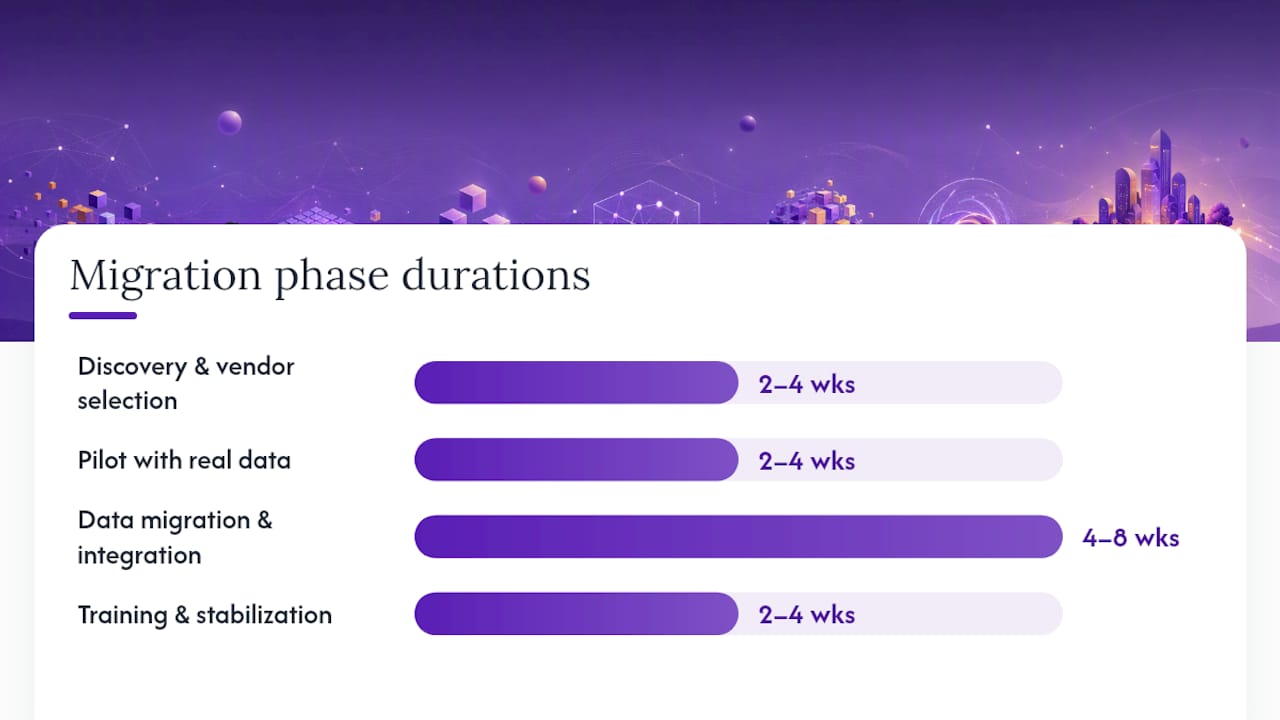
Rough timeline for a mid-market SaaS migration:
- Discovery and vendor selection: 2–4 weeks (compressed to days with AI).
- Pilot with real data: 2–4 weeks.
- Data migration and integration rebuild: 4–8 weeks depending on complexity.
- Training and stabilization: 2–4 weeks.
To compare keep vs. replace numerically: estimate the total migration cost plus risk premium, then project the incremental value the new tool delivers over a full contract term. If the payback period exceeds 18 months, renewal is usually the better call unless the current tool has a hard compliance gap.
Schedule migrations to end-of-quarter or end-of-contract-cycle windows. Mid-quarter switches create budget confusion and adoption friction simultaneously.
How does Toolsplorer accelerate and defend software selection decisions?
Toolsplorer ingests your requirements and returns a stack-ranked shortlist with standardized scorecards built from aggregated reviews, feature data, and current pricing. The platform’s transparent scoring methodology shows exactly how criteria are weighted, so any stakeholder can audit the ranking rather than take it on faith.
Features that matter for procurement teams:
- Weighted scoring templates that map to your criteria and export as decision-ready reports.
- Searchable evaluation archives so past analyses are retrievable at renewal time.
- Red-flag detection on vendor claims that conflict with documented specs.
- Expert review integration: every evaluation can carry a 15-minute human sign-off step.
Vendors now compete to provide data-backed proof that supports buyers’ internal approval processes. Toolsplorer’s exportable executive summaries give your CFO or leadership team exactly that: a structured, sourced rationale for the purchase, not a slide deck built on gut feel. Browse the AI tools catalog to see how individual tools are scored across governance, integrations, and workflow fit.
Speed and governance are not opposites
The conventional wisdom treats AI-driven procurement as a speed play and human review as a governance tax. That framing is wrong. A 15-minute expert check does not slow a decision down; it protects the 6-week implementation that follows. The teams that skip it are the ones filing support tickets about a compliance gap they could have caught in the shortlist phase.
The archive habit compounds this. Every AI analysis you save becomes a reference point for the next renewal cycle. Over 12–18 months, a team that archives consistently builds a vendor intelligence library that makes future evaluations faster and more accurate, not just the current one.
The hybrid approach works because it respects what each layer does well: AI for breadth and consistency, humans for strategic context and accountability.
Toolsplorer gives you a data-backed shortlist, not a longer reading list
Most software searches end with a browser full of tabs and no clear winner. Toolsplorer closes that gap by turning your requirements into a scored, ranked comparison you can hand to leadership the same day.
The platform aggregates reviews from multiple sources, applies a transparent weighted scoring model, and flags the governance and integration questions your procurement team needs answered before signing. You get a shortlist, a scorecard, and an exportable summary built for internal sign-off, not just personal research.
Start your evaluation at Toolsplorer and generate a decision-ready report for your next SaaS purchase.
Sources
- How to Evaluate Software with AI | ClickUp
- The AI Agent Stack for Software Procurement: Automate Tool Selection | Toolradar Blog
- Topreviewed
- Siteup
- AI is making software easier to find and harder to buy according to new G2 research | PR Newswire
Validate any AI-generated recommendation against the vendor’s primary documentation, a live trial with real data, and your own contract review before signing.
FAQ
Can AI fully automate SaaS selection without human input?
No. AI handles discovery, normalization, and initial scoring well, but it cannot account for org-specific constraints like CISO mandates, contractual history, or internal risk tolerances. A short human review remains necessary.
How long does an AI-driven software evaluation take?
Discovery and shortlisting can compress from weeks to hours with agent-based workflows. Add 2–4 weeks for a real-data pilot and the 15-minute expert validation before a final decision.
What criteria should carry the most weight in a SaaS scorecard?
It depends on your team’s priorities. Security and compliance typically warrant 20–25% for regulated industries; use-case fit and workflow integration often dominate for marketing and operations teams. Run a sensitivity check whenever two finalists score within 0.3 points of each other.
How does Toolsplorer differ from running a manual AI comparison?
Toolsplorer aggregates reviews, applies a transparent weighted scoring model, and produces exportable decision reports with red-flag detection built in. Manual AI queries require you to build and maintain that structure yourself.
When should you renew instead of replacing a SaaS tool?
When the total migration cost plus risk premium takes longer than 18 months to recover through the new tool’s incremental value, renewal is usually the better call unless the current tool has a hard compliance gap.