

Start your vendor research at Toolsplorer, where AI-driven scoring aggregates feature data, pricing signals, and verified reviews into side-by-side shortlists so you can cut a 20-vendor longlist to a demo-ready shortlist in an afternoon. For teams that already know which direction they’re heading, here are the top picks:
- Toolsplorer — Best starting point for vendor research; aggregates scoring, reviews, and feature comparisons across the AP market.
- Bill.com (BILL) — Best for SMBs that need fast onboarding, AI invoice capture, and deep QuickBooks/Xero integrations.
- Tipalti — Best for companies with high international payables and multi-currency supplier networks.
- Coupa — Best for mid-market to enterprise teams that need real-time spend analytics and multi-country compliance.
- Stampli — Best for teams that prioritize approver collaboration and a clean, approachable UX.
- Medius — Best for high-volume finance teams targeting touchless processing at scale.
- Basware — Best for large organizations with complex e-invoicing and procurement integration requirements.
- HighRadius — Best for mid-market to enterprise teams focused on automated matching and exception reduction.
- Yooz — Best for teams that need rapid deployment without heavy IT involvement.
- ApprovalMax — Best for organizations that need granular approval routing with Xero or QuickBooks.
- Plooto / Melio — Best for very small businesses that need simple vendor payments and fast reconciliation.
- Ramp Bill Pay — Best for businesses combining corporate card spend controls with AP payments.
Three capabilities separate the vendors that actually move the needle: AI-based OCR extraction (which Gartner peer reviewers consistently flag as a top differentiator), two- and three-way PO matching, and integrated payment rails. Any platform missing all three is a step backward from what the market now treats as table stakes.
Key Takeaways
The best accounts payable software for most U.S. finance teams combines AI invoice capture, two- or three-way PO matching, and integrated payment rails, with ERP fit as the single most important selection criterion.
| Point | Details |
|---|---|
| ERP fit is the top criterion | Choose a platform with a pre-built, maintained connector to your ERP before evaluating any other feature. |
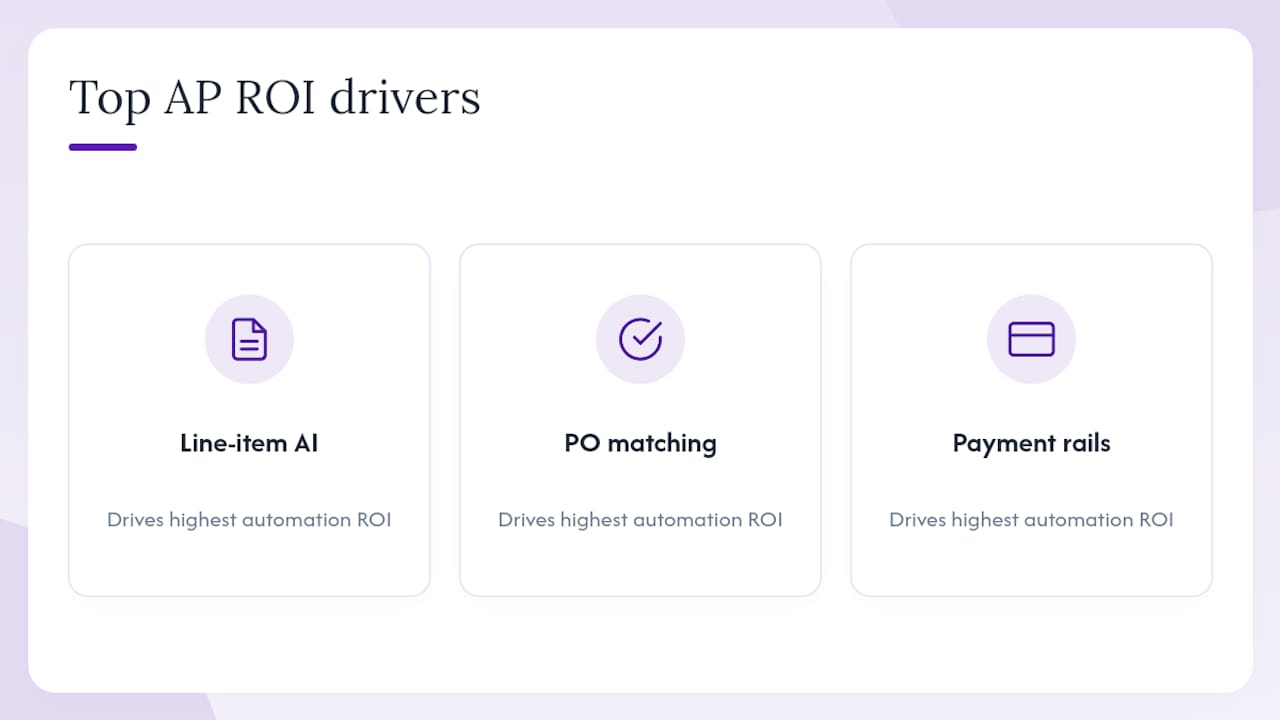
| Three capabilities drive ROI | AI line-item extraction, PO matching depth, and integrated payment rails deliver the highest automation returns. |
| Cost-per-invoice benchmark | Automated AP functions can target under $3 per invoice; manual processes often run $10–$15 or more. |
| Time savings are material | Platforms like Bill.com report ~50% AP time savings; Corpay’s managed service reports ~40% processing time reduction. |
| Toolsplorer for vendor research | Use Toolsplorer’s AI-scored directory to shortlist AP vendors by ERP integration and company size before booking demos. |
Table of Contents
- How the top AP automation solutions compare at a glance
- Vendor snapshots: what each AP platform does best
- How to choose the right AP automation vendor for your finance team
- Which AP features actually drive automation ROI?
- How Toolsplorer scored and evaluated these AP platforms
- What ROI should you expect from AP automation?
- What finance leaders often miss when choosing AP software
- Authoritative sources and further reading
- Toolsplorer helps you shortlist AP vendors faster
- FAQ
How the top AP automation solutions compare at a glance
The table below covers the core selection dimensions finance teams use to narrow a vendor list. Pricing signals reflect publicly available information; most enterprise platforms require a custom quote.
| Product | Best for | Key features | ERP & accounting integrations | Pricing signals | Implementation effort | Payment methods | Security & compliance | Reporting & analytics | Support |
|---|---|---|---|---|---|---|---|---|---|
| Toolsplorer | Starting vendor research | AI scoring, feature comparison, aggregated reviews | N/A (directory) | Free to use | Immediate | N/A | Editorial methodology | Side-by-side scoring | Self-serve + editorial |
| Bill.com (BILL) | SMBs, accounting firms | AI capture, approvals, payments | QuickBooks, Xero, Sage, NetSuite | Subscription per user/month | Low (days–2 weeks) | ACH, check, card, international wire | SOC 1/2 | Spend dashboards | Chat, phone, email |
| Tipalti | Global payables, high volume | Supplier portal, multi-currency, tax compliance | NetSuite, QuickBooks, Xero, SAP | Custom quote (mid-market+) | Medium (4–8 weeks) | ACH, wire, PayPal, local methods, 196 countries | SOC 1/2, OFAC screening | Payment & supplier analytics | Dedicated CSM |
| Coupa | Mid-market to enterprise | Template-free ingestion, CaaS, spend analytics | SAP, Oracle, NetSuite, Workday | Custom enterprise pricing | High (8–16 weeks) | ACH, card, wire, global | SOC 2, CaaS 50+ countries | Real-time spend analytics | Enterprise SLA |
| Basware | Large orgs, e-invoicing | E-invoicing, PO matching, procurement integration | SAP, Oracle, Microsoft Dynamics | Custom quote | High (8–20 weeks) | ACH, wire, e-invoicing networks | SOC 2, PEPPOL-certified | Procurement analytics | Dedicated support |
| Oracle NetSuite | NetSuite ERP users | Native AP, PO matching, approvals | Native Oracle ERP | ERP module pricing | Medium–High | ACH, wire | SOC 1/2 | ERP-native reporting | Oracle support tiers |
| Sage Intacct | Mid-market finance teams | AP workflows, financial controls, multi-entity | Salesforce, ADP, Avalara | Subscription (custom) | Medium (4–8 weeks) | ACH, check | SOC 1/2 | Financial reporting | Partner + direct |
| Medius | High-volume, touchless AP | Touchless processing, AI matching, workflow | SAP, Oracle, Microsoft, NetSuite | Custom quote | Medium–High (6–12 weeks) | ACH, wire | SOC 2, GDPR | AP performance dashboards | Dedicated CSM |
| HighRadius | Complex matching, enterprise | Automated matching, analytics, AI coding | SAP, Oracle, NetSuite | Custom enterprise pricing | High (8–16 weeks) | ACH, wire | SOC 2 | Advanced analytics | Enterprise support |
| Yooz | SMB–mid-market, fast deploy | Cloud capture, approvals, integrations | QuickBooks, Sage, NetSuite, Microsoft | Subscription tiers | Low–Medium (2–6 weeks) | ACH, check | SOC 2 | Standard AP reports | Chat + email |
| Tungsten (AP Agility) | Complex invoice types | AI capture, validation, exception handling | SAP, Oracle, Microsoft | Custom quote | Medium (4–10 weeks) | ACH, wire | SOC 2 | Extraction analytics | Dedicated support |
| Stampli | Collaboration-first AP | Collaborative approvals, AI coding, chat | QuickBooks, NetSuite, Sage, Microsoft | Subscription (custom) | Low (1–3 weeks) | ACH, check, card | SOC 2 | Approval workflow reports | Dedicated CSM |
| ApprovalMax | Xero/QuickBooks approval routing | Approval workflows, multi-step routing | Xero, QuickBooks Online | Subscription per user/month | Low (days–1 week) | Via accounting system | SOC 2 | Approval audit trails | Email + chat |
| Quadient AP (Beanworks) | SMB–mid-market approvals | Invoice capture, approval workflows, vendor access | QuickBooks, Sage, NetSuite | Subscription tiers | Low–Medium (2–4 weeks) | ACH, check | SOC 2 | AP workflow reports | Chat + email |
| Ramp Bill Pay | Spend + AP combined | Corporate card + AP payments, spend controls | QuickBooks, NetSuite, Xero | Free core + paid tiers | Low (1–2 weeks) | ACH, check, card | SOC 2 | Spend analytics | Chat + email |
| Plooto | Small business payments | Vendor payments, reconciliation, approvals | QuickBooks, Xero | Subscription per transaction | Low (days) | ACH, EFT, wire | SOC 2 | Basic payment reports | Email + chat |
| Melio | Very small businesses | Bill pay, vendor payments, scheduling | QuickBooks, Xero | Free + transaction fees | Very low (hours) | ACH, check, card | SOC 2 | Basic reports | |
| Dext | Document capture, bookkeeping | Receipt/invoice capture, data extraction | QuickBooks, Xero, Sage | Subscription tiers | Low (days) | Via accounting system | SOC 2 | Capture reports | Chat + email |
| Draycir (Spindle) | Mixed-format invoice capture | Document capture, routing, workflow | Sage, Microsoft Dynamics | License + subscription | Medium (2–6 weeks) | Via ERP | SOC 2 | Workflow reports | Partner support |
| Zone & Co | Specialized NetSuite deployments | AP workflows, NetSuite-native | NetSuite | Custom quote | Medium (4–8 weeks) | ACH, wire | SOC 2 | NetSuite-native reporting | Dedicated support |
Pricing signals worth noting: SMB platforms (Bill.com, ApprovalMax, Plooto, Melio, Yooz) typically publish per-user or per-transaction subscription tiers starting in the low hundreds per month. Mid-market and enterprise platforms (Coupa, Tipalti, Basware, HighRadius, Medius) almost universally require a custom quote, with annual contract values that can reach five or six figures depending on invoice volume and module count. Per-invoice pricing models are less common now; most vendors have shifted to seat-based or volume-tiered subscriptions.
Vendor snapshots: what each AP platform does best
Toolsplorer
Toolsplorer is not an AP processing platform; it’s the research layer that sits before you buy one. Its AI-driven scoring aggregates user reviews, feature data, and pricing signals from across the market into ranked shortlists for the finance and accounting category. For a finance team that’s staring at 15 vendor names and no clear way to narrow them, that’s a genuinely useful starting point.
Pros: Vendor-neutral scoring; aggregates reviews from multiple sources; free to use; covers pricing signals and integration depth side by side.
Cons: Not a transactional platform; doesn’t replace a vendor demo or a proof-of-concept trial.
Who should start here: Any finance team at the beginning of a vendor evaluation, especially one without a dedicated procurement analyst.
Demo question equivalent: “Which vendors score highest for my company size and ERP?”
Bill.com (BILL)
Bill.com reports that customers save roughly 50% of their AP processing time through AI-powered invoice capture and automated routing. That claim is plausible for SMBs moving off manual email-and-spreadsheet workflows. The platform’s real strength is its payment infrastructure: ACH, check, card, and international wire from a single interface, paired with tight QuickBooks and Xero integrations that most SMB accounting teams already use.
Pros: Fast onboarding; strong payment rails; deep SMB accounting integrations; AI capture reduces manual entry.
Cons: Less suited to complex PO matching at scale; enterprise features require higher tiers; some users report limited customization.
Integrations: QuickBooks, Xero, Sage, NetSuite, Oracle.
Who should demo: SMBs and accounting firms processing 50–2,000 invoices per month that want payments and AP in one tool.
Demo question: “Show me how a vendor gets paid from invoice receipt to ACH transfer, including the approval step.”
Tipalti
Tipalti’s differentiator is supplier enablement: it handles the onboarding, tax form collection (W-9/W-8), and payment method selection for each payee, which matters enormously when you’re paying contractors or suppliers in 30+ countries. The platform supports payments in 196 countries across ACH, wire, PayPal, and local payment methods, with built-in OFAC screening and tax compliance.
Pros: Best-in-class global payment coverage; supplier self-service portal reduces AP team workload; strong tax compliance automation.
Cons: Implementation typically runs 4–8 weeks; pricing is custom and tends toward mid-market budgets; lighter on spend analytics than Coupa.
Integrations: NetSuite, QuickBooks, Xero, SAP, Microsoft Dynamics.
Who should demo: Companies paying 50+ international vendors regularly, or any business where supplier onboarding is a recurring bottleneck.
Demo question: “Walk me through how a new international supplier gets onboarded, submits a W-8, and receives their first payment.”
Coupa
Coupa’s AP platform leads with template-free document ingestion, meaning it doesn’t require pre-configured templates for each supplier’s invoice format. That’s a real operational advantage at scale. Its Compliance-as-a-Service covers 50+ countries, and the real-time spend analytics layer gives CFOs visibility that most AP tools simply don’t offer. SAP Concur’s guidance on evaluating AP automation specifically calls out real-time analytics and compliance as the criteria that separate good platforms from great ones — Coupa is built around exactly those two axes.
Pros: Template-free ingestion; CaaS for multi-country compliance; strong spend analytics; enterprise-grade scalability.
Cons: Implementation is complex and typically takes 8–16 weeks; pricing is enterprise-level; requires dedicated IT and change management resources.
Integrations: SAP, Oracle, NetSuite, Workday, Microsoft Dynamics.
Who should demo: Mid-market and enterprise organizations operating in multiple countries that need compliance and analytics baked in, not bolted on.
Demo question: “How does your CaaS handle a new e-invoicing mandate in a country we’re expanding into?”
Basware
Basware is one of the most established names in e-invoicing, with particular strength in large organizations that need to comply with procurement-driven invoicing standards. Its network connectivity and PEPPOL certification matter for companies operating in Europe or with government procurement requirements. For U.S.-only deployments, Basware is often more platform than necessary.
Pros: Deep e-invoicing compliance; strong procurement integration; large-scale processing capability.
Cons: Implementation is lengthy (8–20 weeks is realistic); pricing is enterprise-only; UX is less modern than newer entrants.
Integrations: SAP, Oracle, Microsoft Dynamics.
Who should demo: Large organizations with complex procurement-to-pay requirements or significant European operations.
Demo question: “How does your platform handle PEPPOL compliance and what’s the timeline for adding a new country?”
Oracle NetSuite
NetSuite’s AP capability is native to its ERP, which is its primary advantage and its primary constraint. If your organization already runs NetSuite for financials, the AP module eliminates the integration layer entirely and keeps everything in a single system of record. If you’re not a NetSuite shop, there’s no compelling reason to adopt it for AP alone.
Pros: Native ERP integration; single system of record; no middleware required; strong financial controls.
Cons: AP features are less advanced than dedicated AP platforms; requires NetSuite licensing; customization needs developer resources.
Who should demo: Companies already on NetSuite ERP that want to avoid a third-party integration.
Demo question: “Show me how AP exceptions surface in the ERP and how they’re resolved without leaving the system.”
Sage Intacct
Sage Intacct sits in a useful middle ground: more financial control and reporting depth than a pure AP tool, less complexity than a full ERP. Its multi-entity support is genuinely strong for mid-market companies managing several legal entities or subsidiaries. AP workflows are solid, though the platform is more accounting-first than AP-automation-first.
Pros: Strong financial reporting; multi-entity support; good controls for mid-market; cloud-native.
Cons: AP automation features are less advanced than dedicated platforms; implementation requires a partner; pricing is custom.
Integrations: Salesforce, ADP, Avalara, Expensify.
Who should demo: Mid-market companies that prioritize financial controls and reporting alongside AP, especially multi-entity organizations.
Demo question: “How does the system handle intercompany AP transactions across three entities?”
Medius
Medius is built for high-volume environments where touchless processing rate is the primary KPI. Its end-to-end AP automation covers capture, coding, matching, and approval routing with a focus on minimizing human touchpoints. Gartner peer reviews of Medius consistently highlight its matching accuracy and workflow configurability as standout strengths.
Pros: High touchless processing rates; strong PO matching; configurable workflows; good ERP breadth.
Cons: Implementation runs 6–12 weeks; pricing is custom; less suited to very small teams.
Integrations: SAP, Oracle, Microsoft Dynamics, NetSuite.
Who should demo: Finance teams processing 5,000+ invoices per month that are actively measuring touchless rate as a KPI.
Demo question: “What’s your average touchless processing rate across customers with our invoice volume and mix?”
HighRadius
HighRadius focuses on the matching and exception side of AP: automated two- and three-way PO matching, AI-driven invoice coding, and analytics that surface exception patterns. It’s built for organizations where matching complexity, not just volume, is the problem.
Pros: Strong automated matching; exception analytics; AI coding accuracy; enterprise scalability.
Cons: Heavy implementation; enterprise pricing; less intuitive for smaller teams.
Integrations: SAP, Oracle, NetSuite.
Who should demo: Enterprise AP teams where PO matching exceptions are a significant source of cycle-time delay.
Demo question: “Show me how the system handles a three-way match exception and routes it for resolution.”
Yooz
Yooz competes on speed of deployment. For SMB and mid-market teams that want cloud AP automation without a multi-month implementation project, it’s a credible option. The feature set covers the core workflow: capture, coding, approval, and payment integration. It won’t win on depth against Coupa or Medius, but it goes live faster.
Pros: Fast deployment (2–6 weeks); straightforward UX; broad accounting integrations; good for teams new to AP automation.
Cons: Less advanced matching and analytics than enterprise platforms; limited global payment support.
Integrations: QuickBooks, Sage, NetSuite, Microsoft Dynamics.
Who should demo: Mid-market teams that need AP automation running within a quarter and don’t have complex PO matching requirements.
Demo question: “What’s the typical time from contract signature to first invoice processed live?”
Tungsten (AP Agility)
Tungsten’s strength is AI-based capture across complex and non-standard invoice formats. For organizations receiving invoices in dozens of formats from hundreds of suppliers, Tungsten’s extraction accuracy is a genuine differentiator. AppZen’s autonomous AP positioning points to the same trend: AI-native extraction is increasingly the baseline expectation, and Tungsten has been building that capability longer than most.
Pros: Strong AI extraction across complex formats; good validation rules; enterprise-grade.
Cons: Implementation is medium-to-heavy; pricing is custom; less modern UX than newer entrants.
Integrations: SAP, Oracle, Microsoft Dynamics.
Who should demo: Organizations with highly variable invoice formats or high exception rates driven by extraction errors.
Demo question: “Run our 20 most complex invoice formats through your extraction engine and show me the accuracy results.”
Stampli
Stampli’s collaboration interface puts approver communication directly on the invoice, which sounds like a small UX detail but meaningfully reduces the back-and-forth that stalls approvals. Its AI assistant (Billy the Bot) learns coding patterns over time. Implementation is genuinely fast, often 1–3 weeks, which is rare for a platform with this level of workflow configurability.
Pros: Collaborative approval UX; fast implementation; AI coding that improves over time; strong mid-market fit.
Cons: Payment capabilities are less comprehensive than Tipalti or Bill.com; enterprise scalability has limits.
Integrations: QuickBooks, NetSuite, Sage, Microsoft Dynamics, SAP.
Who should demo: Teams where slow approvals are the primary AP bottleneck and where a clean, approver-friendly interface would drive adoption.
Demo question: “Show me how an approver handles an exception from their phone without logging into the main system.”
ApprovalMax
ApprovalMax is an approval workflow engine, not a full AP platform. It plugs into Xero or QuickBooks Online and adds multi-step, role-based approval routing that those accounting systems don’t natively support. For small finance teams that already live in Xero and just need better controls, it’s a precise, low-cost fix.
Pros: Granular approval routing; fast setup; affordable; strong Xero/QuickBooks integration.
Cons: Not a standalone AP platform; depends on the underlying accounting system for capture and payments.
Who should demo: Small to mid-size teams on Xero or QuickBooks that need approval controls without replacing their accounting system.
Demo question: “How do you handle a purchase order approval that requires three different approvers based on amount and department?”
Quadient AP Automation (Beanworks)
Quadient AP (formerly Beanworks) covers the core SMB-to-mid-market AP workflow: invoice capture, approval routing, and vendor access. Its vendor portal lets suppliers check payment status without calling your AP team, which reduces inbound queries noticeably for teams with large vendor bases.
Pros: Practical approval workflows; vendor self-service portal; good accounting integrations.
Cons: Less advanced AI extraction than enterprise platforms; limited global payment support.
Integrations: QuickBooks, Sage, NetSuite.
Who should demo: SMB and mid-market teams that want structured approvals and a vendor portal without enterprise complexity.
Dext
Dext is primarily a document capture and data extraction tool used by bookkeepers and small finance teams. It pulls data from receipts, bills, and invoices and pushes it into accounting systems. It’s not a full AP automation platform, but for teams that spend significant time on manual data entry, it removes that specific pain point cleanly.
Who should demo: Bookkeepers and small finance teams where manual data entry is the primary inefficiency.
Draycir (Spindle)
Draycir’s Spindle product focuses on document capture and routing for organizations dealing with mixed paper and digital invoice formats. It integrates primarily with Sage and Microsoft Dynamics. A reasonable choice for teams that need capture automation without replacing their existing ERP workflow.
Who should demo: Teams on Sage or Microsoft Dynamics with high paper invoice volumes.
Ramp Bill Pay
Ramp combines corporate card spend management with AP bill payment in a single platform. For businesses that want unified visibility across card spend and vendor invoices, the combination is genuinely useful. The core platform is free; paid tiers unlock advanced features.
Pros: Unified spend and AP visibility; free core tier; fast setup; strong SMB fit.
Cons: AP features are less deep than dedicated platforms; less suited to complex approval hierarchies.
Integrations: QuickBooks, NetSuite, Xero.
Who should demo: Growth-stage businesses that want spend controls and AP payments in one tool.
Plooto and Melio
Both serve the small-business end of the market. Plooto focuses on vendor payments and reconciliation with QuickBooks and Xero integrations; Melio is even simpler, prioritizing fast bill payment scheduling for very small teams. Neither is a full AP automation platform, but both solve the “we’re still cutting paper checks” problem quickly and affordably.
Who should demo: Businesses under 50 employees that need vendor payment automation without a multi-week implementation.
Zone & Co
Zone & Co appears in 2026 AP market roundups as a NetSuite-native AP solution with a focused feature set for organizations that want AP workflows built directly on their NetSuite instance. Detailed public information on pricing and implementation timelines is limited; a direct conversation with their sales team is the right next step for NetSuite shops evaluating alternatives to the native module.
How to choose the right AP automation vendor for your finance team
The single most important factor is ERP fit. A platform that integrates natively or via a pre-built, maintained connector to your ERP eliminates the biggest implementation risk and the most common source of post-go-live data problems. Everything else, including AI extraction quality and payment rails, matters less if the integration layer is fragile.
Selection checklist
Must-haves for most finance teams:
- Pre-built, actively maintained integration to your primary ERP or accounting system
- AI-based invoice capture with line-item extraction (not just header data)
- Two-way or three-way PO matching appropriate to your procurement volume
- Configurable approval workflows with mobile access for approvers
- ACH and check payment support at minimum; wire and card if you pay internationally
- SOC 2 Type II certification and role-based access controls
- Audit trail and document retention that meets your industry’s compliance requirements
Nice-to-haves (prioritize based on your complexity):
- Supplier self-service portal for status inquiries and onboarding
- Multi-currency and global payment support
- Real-time spend analytics and exception dashboards
- Vendor enablement programs that accelerate supplier adoption
- AI-driven coding that learns from your chart of accounts
Demo questions that reveal what vendors won’t volunteer
- “What is your average touchless processing rate across customers with our invoice volume?” (Vendors often quote best-case numbers; ask for median.)
- “Who owns our data if we cancel, and what’s the export format and timeline?”
- “Show me a failed integration scenario and how your support team resolved it.”
- “What does your SLA cover, and what happens when you miss it?”
- “Walk me through your implementation timeline for a company our size, including who from our team needs to be involved and for how many hours per week.”
Which AP features actually drive automation ROI?
The three capabilities that consistently drive the highest automation ROI are: line-item AI extraction, two- or three-way PO matching, and integrated payment rails. Get all three right and you’ve addressed the three biggest sources of manual work in a typical AP function.
1. AI extraction quality
“OCR” is table stakes. What separates good platforms from average ones is line-item extraction accuracy: pulling quantity, unit price, and GL code from the invoice body, not just the header. AppZen’s autonomous AP model demonstrates what’s possible when AI handles the full extraction and coding cycle, including fraud and duplicate detection. When evaluating vendors, ask for extraction accuracy on your own invoice samples during a proof-of-concept, not on their benchmark dataset.
2. PO matching depth
Two-way matching (invoice vs. PO) catches price and quantity discrepancies. Three-way matching (invoice vs. PO vs. goods receipt) catches delivery discrepancies too. For manufacturing, distribution, or any business with significant physical goods procurement, three-way matching is the capability that prevents overpayment. The platforms that do this well (Medius, HighRadius, Coupa, Basware) have invested years in exception-handling logic; the gap between them and lighter tools is real.
3. Payment rail breadth
An AP platform that automates invoice processing but still requires manual payment initiation has solved half the problem. Integrated ACH, virtual card, and wire capabilities close the loop. Virtual cards in particular generate rebates that can partially offset platform costs, a detail worth asking about during vendor negotiations.
KPIs to track after go-live
Finance teams should measure these metrics before and after implementation to validate ROI:
- Cost per invoice processed (industry benchmarks from Ardent Partners and Corpay suggest well-run AP functions target under $3 per invoice)
For broader context on how e-invoicing compliance affects these metrics in global deployments, Tradeshift’s compliance coverage across 70 countries is a useful reference point.
How Toolsplorer scored and evaluated these AP platforms
The shortlist and comparisons above reflect Toolsplorer’s editorial scoring methodology, which weights six dimensions. No vendor paid for placement, and no vendor was included solely on the basis of market size.
Scoring dimensions and approximate weightings:
- Customer reviews and third-party validation — (15%): aggregated from Gartner Peer Insights, G2, Capterra, and verified user reviews.
Data sources: vendor documentation and product pages, verified customer reviews across multiple platforms, analyst market summaries, and vendor demo sessions where available. Toolsplorer’s scoring methodology page describes the full approach.
Limitations to acknowledge: Pricing data for enterprise platforms changes frequently and requires a direct vendor quote. Feature sets evolve with product releases; the comparisons above reflect publicly available information as of mid-2026. Toolsplorer recommends confirming specific capabilities directly with vendors before signing a contract.
Pro Tip: When using Toolsplorer’s directory to shortlist vendors, filter first by ERP integration and company size. Those two filters eliminate more wrong-fit vendors faster than any other dimension.
What ROI should you expect from AP automation?
Corpay’s managed AP automation data shows customers typically reduce AP processing time by roughly 40%. Bill.com reports an average of 50% time savings for its customers. Those figures are directionally consistent with what Ardent Partners has tracked across the broader market: automated AP functions process invoices at a fraction of the cost of manual operations.
Benchmark context: Organizations with highly manual AP processes often spend $10–$15 or more per invoice when staff time, error correction, and late-payment penalties are included. Well-automated AP functions can bring that figure below $3 per invoice.
A simple break-even example: a company processing 1,000 invoices per month at a baseline cost of $10 per invoice spends $10,000 per month on AP processing. A platform that reduces that cost by 40% saves $4,000 per month. At a platform cost of $2,000 per month, payback is under two months. At $8,000 per month (a realistic mid-market enterprise platform cost), payback takes about four months. The math works at almost any invoice volume above a few hundred per month, which is why AP automation has become one of the highest-ROI finance technology investments available to mid-market companies.
Beyond cost, the less-discussed benefit is payment timing control. Automated AP gives finance teams the data to capture early-payment discounts and avoid late fees, both of which directly affect cash flow. For companies with thin margins, that visibility alone can justify the investment.
What finance leaders often miss when choosing AP software
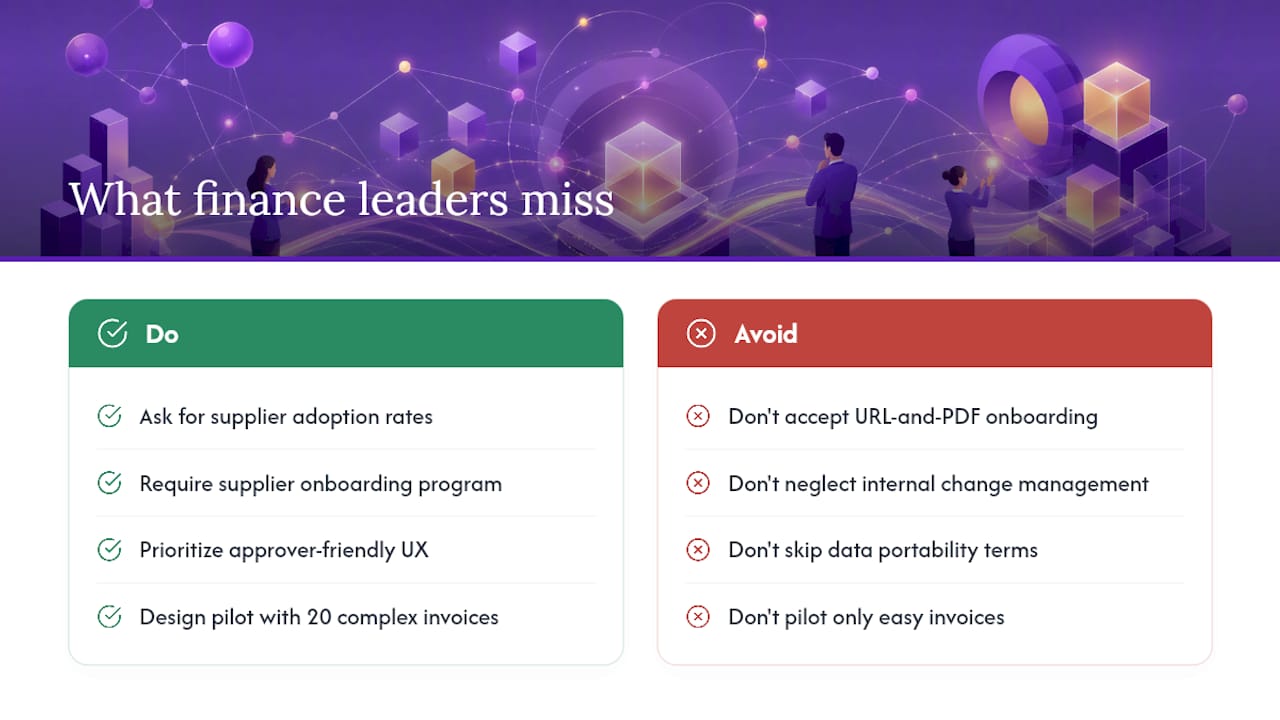
The most commonly overlooked risk in an AP software selection is not the platform itself. It’s vendor enablement: how quickly and completely your suppliers adopt the new submission method. A platform with 95% extraction accuracy still fails if 40% of your suppliers keep emailing PDFs to the wrong address.
Most AP automation vendors offer a supplier portal, but the quality of their supplier onboarding program varies enormously. Some provide white-labeled communication templates, dedicated onboarding calls, and a supplier help desk. Others hand you a URL and a PDF. Ask specifically about supplier adoption rates among their existing customers and what support they provide during the first 90 days post-go-live.
The second thing teams underestimate is the internal change management requirement. AP automation doesn’t just change the AP team’s workflow; it changes how every approver in the organization interacts with invoices. Platforms with a clean approver UX (Stampli is the clearest example) get adopted faster because approvers don’t resist using them. Platforms that require approvers to log into an unfamiliar enterprise portal see slower adoption and more exceptions routed back to the AP team.
On contract terms: always negotiate data portability upfront. Specify the export format, the timeline for data delivery after termination, and who owns the trained AI models if the vendor has customized extraction for your invoice types. These points are easy to negotiate before signing and nearly impossible to fix after.
Pro Tip: Design your pilot around your 20 most complex invoice types, not your easiest ones. A vendor that handles your edge cases in the proof-of-concept will handle your standard invoices without issue. The reverse is rarely true.
Authoritative sources and further reading
The claims and comparisons in this article draw on the following sources. Vendor features and pricing change frequently; confirm specifics directly with vendors before making a purchase decision.
- AP Automation | Concur
- AP Automation | Corpay
- Accounts Payable Software | Bill.com
- Tradeshift | E-Invoicing software | Global compliance and clearance
- Accounts Payable Automation Software to Cut Invoice Costs Fast | Coupa
- AP Automation Software | AppZen
Freshness note: This article reflects publicly available vendor information as of mid-2026. AP software features, pricing, and compliance coverage change regularly. Always verify current capabilities with vendors directly.
Toolsplorer helps you shortlist AP vendors faster
Comparing 20 AP automation vendors is a real time sink, and most finance teams don’t have a dedicated procurement analyst to do it. Toolsplorer’s AI-scored software review directory cuts that research time significantly by aggregating feature data, pricing signals, and verified user reviews into ranked shortlists you can filter by ERP integration, company size, and use case.
The vendors compared in this article (Bill.com, Tipalti, Coupa, Stampli, and the rest) each have their own strengths, and the right choice depends on your invoice volume, ERP, and approval complexity. Toolsplorer’s directory gives you a structured way to compare them side by side before you spend time on demos. You can also browse the full automation tools category for related workflow software that complements AP automation, from expense management to procurement.
Start your comparison at Toolsplorer’s directory and filter by the dimensions that matter most to your team. No sales call required to get a shortlist.
FAQ
What is the most reliable AP automation software?
Reliability depends on your ERP and invoice volume. Gartner peer reviews consistently rate Tipalti, Coupa, and Medius highly for enterprise reliability; Bill.com leads for SMB dependability and uptime. Use Toolsplorer’s scored directory to filter by your specific ERP and company size for a more precise match.
What is the easiest AP software to use?
Bill.com and Stampli consistently receive the highest usability ratings among mid-market AP platforms. Melio and ApprovalMax are the simplest options for very small teams, with onboarding measured in hours rather than weeks.
Is AI replacing accounts payable teams?
AI is shifting AP teams from data entry to exception management, not eliminating them. Platforms like AppZen automate extraction, coding, and matching, but human judgment remains necessary for complex exceptions, vendor disputes, and policy decisions. The AP function shrinks in headcount for routine tasks and grows in strategic value.
What are the top accounting software platforms that include AP?
QuickBooks, Xero, and Sage Intacct all include AP functionality as part of their broader accounting platforms. For dedicated AP automation layered on top of accounting software, Bill.com, Stampli, and ApprovalMax are the most widely adopted options in the U.S. mid-market.
How long does AP automation implementation typically take?
SMB platforms like Bill.com, Stampli, and Yooz typically go live in 1–6 weeks. Enterprise platforms like Coupa, Basware, and HighRadius require 8–20 weeks depending on ERP complexity, data migration scope, and the number of approval workflows being configured.